Free Tech Hacks Every College Student Should Be Using
Free Tech Hacks Every College Student Should Be Using
By Chelsea Quann, MS, LEP, PPS, licensed educational psychologist (#4640)
Utilizing college accommodations and tech involves leveraging both university-approved software and free built-in device features to manage unstructured time and access your curriculum efficiently. While universities are legally required to ensure equal access to your education if you have a condition (like ADHD or a learning disorder) that limits your functioning in an academic setting, they do not always supply personal assistive devices or paid software subscriptions. Below, we explore the most effective free and low-cost tech tools you already have access to, how they integrate with your disability supports, and why mastering them now is essential for university success.
The Shift in Assistive Technology for College Accommodations
In K-12 special education, school districts often purchase specific software licenses or devices for students with Individualized Education Programs (IEPs). At the university level, the legal framework shifts from guaranteed success to equal access. This means a college will provide the accommodation—such as permission to record a lecture or providing textbooks in an alternate digital format—but they usually consider the recording app or the text-to-speech software itself to be a personal device that the student must provide.
Is Tech a Crutch?
Some parents and educators fear that using assistive technology, like speech-to-text, will prevent students from developing their independent skills, treating tech as a "crutch". However, this is a dangerous misconception. As assistive technology experts explain, these tools are not there to help students avoid work, and students don't utilize them because they are lazy. Using technology simply makes the work process more efficient, allowing students to output their actual intelligence rather than getting bogged down by a processing deficit. It is much like choosing to drive a car to work instead of walking—you could walk, but driving is simply a more efficient use of your energy.
The "3-Tier Tech Framework": Free Hacks You Already Have
To navigate college accommodations and tech effectively without spending hundreds of dollars, I recommend students utilize the 3-Tier Tech Framework. Start with what is free and built-in, then move to browser extensions, and only pay for specialized software if the first two tiers fall short.
Tier 1: Built-In Operating System Accessibility
You do not need a fancy app to get started. The devices you already carry are packed with powerful, free accessibility tools.

- Mac and PC Tools: Simply search "Apple accessibility" or "Microsoft accessibility" on your laptop. Both Windows 11 and Mac OS have highly functional, built-in speech recognition (dictation) and voice control tools.
- Smartphone Hacks: If you have brilliant ideas but struggle to get them onto a blank page due to executive dysfunction or dysgraphia, open the basic Notes app on your phone. Use the voice-to-text feature to dictate your rough draft while pacing your dorm room, then email the text to yourself to edit on your laptop.
Tier 2: Free Browser-Based Tools
If your device's built-in tools are not enough, turn to your internet browser.
- Immersive Reader: Microsoft Edge features a free tool called Immersive Reader that provides text-to-speech functionality right in the browser, making heavy reading loads much more manageable.
- Snap&Read and Natural Reader: Snap&Read is a simple browser plug-in that can capture text and read it aloud. Natural Reader also offers a free web-based version that can convert Word documents, PDFs, and PowerPoint slides into spoken audio.
Tier 3: Leveraging University-Provided Tech
While colleges don't buy personal laptops, many disability services offices do purchase "cloud-based" licenses for software that they can assign to students who qualify. Check if your university offers seats for programs like Glean (for audio note-taking) or Equatio (for digitizing math problems). If you aren't using the license, the school can easily reassign it to another student, so always ask what is available.
Essential Tech Hacks for Specific College Challenges
Note-Taking and Lectures
Colleges are rapidly moving away from providing human peer note-takers, as they are often unreliable and take notes based on their own background knowledge, which may not match what you need. Instead, universities frequently approve the accommodation of "permission to record lectures".
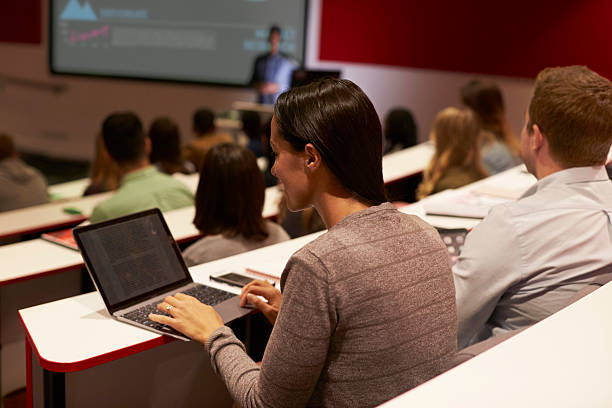
- The Hack: Use tools like Otter.ai or Glean. Otter.ai (which powers Zoom's transcription) offers a free basic tier that provides highly accurate transcriptions of spoken audio. Glean allows you to record the professor's audio while typing brief notes and using emojis to "mark" important timestamps in the lecture so you can quickly review them later.
Tackling Heavy Reading Loads
Text-to-speech software is one of the most evidence-supported assistive technologies for college students with dyslexia and ADHD.
- The Hack: Ensure you register with the disability office early so they have time to convert your physical textbooks into accessible digital PDFs. Once converted, use your free text-to-speech browser tools to listen to the text while reading along, which drastically improves comprehension and reading stamina.
Executive Functioning and Time Management
A major hurdle in college is the sudden abundance of unstructured time. Relying on memory to track due dates often fails due to "time blindness".
- The Hack: Digitize your syllabus on day one. Use the free University of Toronto Assignment Calculator, which breaks down massive research papers into manageable, step-by-step interim deadlines. Then, put every deadline into a digital calendar (like Google Calendar) and set multiple, repeating alarms on your phone to trigger task initiation (e.g., one alarm to prompt you to brush your teeth, another to prompt you to open your textbook). When you study, use the Pomodoro Method (25 minutes of work, 5 minutes of rest) using a free timer app on your phone to build focus stamina without burning out.
Why You Need to Master Tech Before Move-In Day
The transition to higher education brings massive new social, academic, and independent living demands. Waiting until you arrive on campus to learn how to use a screen reader or a dictation program means you are attempting to learn a complex new software at the exact same time you are trying to learn college-level biology. High school students must practice with these assistive technology tools before college so that using them is second nature by the time they enroll.
Why I Wrote This
As a licensed educational psychologist, I have run countless psychoeducational assessments for students transitioning to college. I frequently see teens arrive at college feeling overwhelmed and academically drowning, entirely unaware that their laptop already contains the exact tools they need to support their processing speed or reading fluency deficits. I want to empower you to turn your everyday devices into your most powerful academic allies, ensuring you know exactly how to leverage both accommodations and tech to level the playing field.
FAQs About College Accommodations and Tech
Will my college buy me a laptop or specialized software?
Generally, no. Under the ADA, colleges must provide accommodations that ensure equal access, but they are exempt from providing "personal devices" or services of a personal nature. You are expected to provide your own computer, though the disability office may grant you access to their cloud-based software licenses if available.
Can I use dictation software for my exams?
It depends on your approved accommodations. Response accommodations, such as using speech-to-text software or typing a response on a keyboard instead of hand-writing, must be formally requested, supported by your evaluation data, and approved by the disability services office.
Can I record any lecture I want with my phone?
No. You should not record a professor without their permission. You must formally apply through the disability services office to receive "permission to record" as an official accommodation. Once approved, you can use your phone, a smart pen, or apps like Otter.ai to capture the lecture.
About the Author: Chelsea Quann, MS, LEP, PPS, is a licensed educational psychologist (#4640) specializing in psychoeducational assessments for college transitions and high-stakes testing. Learn more at www.blueprintevaluations.com.